

Vinlux has several carrier types. Vinlux Carrier Type = DSD (Default) is for a standard order. If you need other types, create another delivery method but ensure that the Carrier Type value is set as needed.
The Title is a convenient way to label the method but it doesn't do anything. The Vinlux Carrier Type is what is sent to Vinlux.
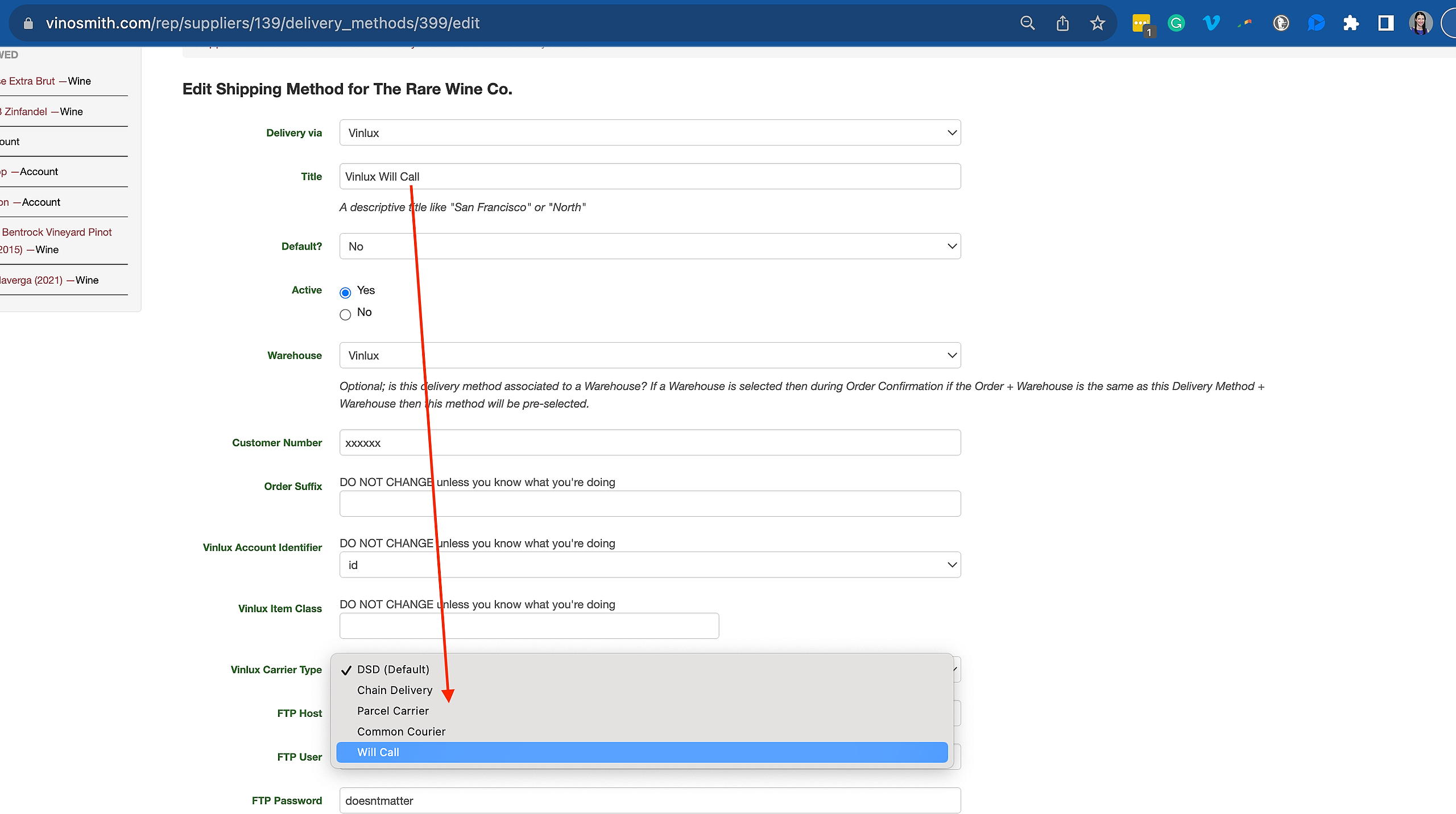
How to Create a Delivery Method at the Supplier Level:
Navigate to the Products tab
In the left-hand navigation under Suppliers, click on Manage Suppliers
Click on the supplier you would like to add a delivery method for
In the left-hand navigation under Suppliers, click on Delivery Methods
In the left-hand navigation under Delivery Methods, click on Add Method
Select a Vinlux for Delivery Via from the dropdown menu.
Give a Title (Such as Will Call)
Choose whether it is the Default or Not
Select Vinlux Carrier Type (Will Call, Common Courier, Chain Delivery, Parcel Carrier)
At the bottom, select this delivery method to be available via batch.
Click the blue Save button.